Transforming a vague concept into a stunning, highly detailed AI-generated character requires more than just typing a few descriptive words into a text box. Whether you are using Midjourney, Stable Diffusion, or DALL-E, the quality of your output is entirely dependent on the precision, structure, and vocabulary of your input.
Many creators struggle with characters that look generic, have deformed features, or simply do not match their original vision. This happens because AI models interpret language literally and rely heavily on the sequential weight of the words provided. To move past basic generations and start producing studio-quality character art, you must master the anatomy of a perfect prompt. This involves breaking down your character’s physical traits, the artistic medium, environmental lighting, and camera specifications into a cohesive, structured formula.
By understanding how AI prioritizes information, you can engineer prompts that consistently deliver accurate, highly detailed, and emotionally resonant characters.
The Core Anatomy of a Successful Character Prompt
A well-structured prompt does not read like conversational English. Instead, it functions more like a set of distinct parameters fed into a rendering engine. To maintain control over the final image, your prompt should follow a specific hierarchy, moving from the most critical elements to the finest details.
The ideal sequence generally follows this structure: Medium + Subject + Core Description + Environment + Lighting + Camera Specs + Quality Modifiers.
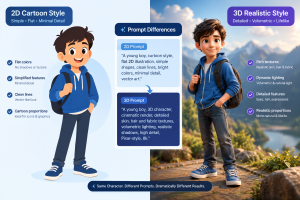
- The Medium: Always define the artistic style first. If you want a 3D animated character, specify “3D render, Pixar style, Octane Render.” If you want photorealism, use “Hyper-realistic photograph, RAW image, 35mm film.” By setting the medium immediately, you lock the AI into a specific aesthetic before it begins processing the character details.
- The Subject and Core Description: This is where you define who the character is. Be precise. Instead of saying “a warrior,” say “a 30-year-old female Celtic warrior.” Include the most prominent physical traits right next to the subject definition. The AI gives the highest weight to the words at the very beginning of the prompt, so your character’s primary identifiers must be placed here.
- Environment and Setting: Characters do not exist in a vacuum. Defining the background prevents the AI from generating a flat, studio-gray backdrop. Keep it relevant to the character, such as “standing in a dense, fog-filled neon cyberpunk alleyway.”
 .
.
Defining Physical Attributes with Extreme Precision
Vagueness is the enemy of good AI art. When describing a character’s physical appearance, you must micromanage the details. AI models have vast datasets, and if you leave an attribute undefined, the model will randomly guess, often leading to inconsistent or chaotic results.
- Facial Features and Expressions: Do not just ask for “a smiling face.” Specify the nuance of the expression. Use phrases like “a subtle, knowing smirk,” “furrowed brows showet trench coat with tarnished brass buttons, over a frayed linen shirt.” Specifying materials like leather, velvet, silk, or rusted metal triggers the AI’s material rendering algorithms, creating accurate light reflections and fabric folds.
Mastering Lighting, Camera Angles, and Mood
Even the most well-described character will look amateurish if the lighting and framing are poor. Professional photographers and 3D artists use specific lighting setups, and you should use these same terms in your prompts.
- Cinematic Lighting: Lighting dictates the entire mood of the generation.
- Volumetric Lighting/God Rays: Creates visible beams of light, perfect for dusty or foggy environments.
- Rim Lighting: Places a harsh light behind the character, creating a glowing outline that separates them from the background.
- Golden Hour: Casts a warm, horizontal, and highly flattering light across the character’s face.
- Cinematic Studio Lighting: Mimics a professional photoshoot, usually resulting in clean, sharp facial features with deep, dramatic shadows (chiaroscuro).
Camera Terminology: Control the composition by telling the AI exactly where to place the “lens.”
- Extreme Close-Up / Macro: Forces the AI to focus entirely on the face or a specific detail like an eye.
- Medium Shot / Cowboy Shot: Captures the character from the waist up.
- Full Body / Wide Shot: Captures the entire character and their surroundings. (Note: AI often struggles with facial details in wide shots unless you specifically add “highly detailed face” to the prompt).
- Low Angle / High Angle: A low angle makes the character look imposing and powerful, while a high angle can make them look vulnerable.
Using specific lens focal lengths, such as “shot on 50mm lens” or “85mm portrait lens,” also helps manage depth of field, effectively blurring the background (bokeh) to keep the character in sharp focus.
Avoiding Common Prompting Mistakes
Creators often sabotage their own prompts by overcomplicating them or using conflicting terminology.
Overcrowding the Prompt: While detail is good, throwing hundreds of unrelated keywords into a prompt confuses the AI. Stacking terms like “photorealistic, 3D render, oil painting, digital art, sketch” gives the AI contradictory instructions. Pick one clear medium and stick to it.
Focusing on Negatives in the Main Prompt: AI models generally do not understand the word “no” or “without” in standard text prompts. If you type “a knight without a helmet,” the AI will read the word “helmet” and likely generate a knight wearing one. Instead of telling the AI what you do not want, describe exactly what you do want (e.g., “a knight with bare head and flowing hair”). If you are using an interface that supports Negative Prompts, place all unwanted elements (e.g., deformed, bad anatomy, extra fingers) in that specific negative prompt box.
Advanced Techniques for Character Consistency
If you are generating characters for a comic book, a game, or a storyboard, keeping the character’s face and attire consistent across multiple generations is a major challenge.
- Using Seed Numbers: Every AI generation is tied to a specific “seed” number. If you generate a character you love, retrieve that image’s seed number. By including that exact seed in your next prompt (along with the same physical description), you drastically increase the chances of the AI generating the same facial structure.
- Reference Images (Image-to-Image): The most reliable way to maintain consistency is to use a base image. You can feed a previously generated image back into the AI and prompt it to change only the expression or the environment. Combining a strong reference image with a highly detailed, rigid text prompt is the industry standard for maintaining narrative consistency in AI character design.
Frequently Asked Questions (FAQs)
What is the most important part of an AI character prompt?
The subject and the medium are the most critical elements. The AI needs to know exactly what it is drawing (a young woman, an old man, a robot) and in what artistic style (photorealism, anime, 3D render) before it can process secondary details like clothing or background.
Why does the AI always mess up hands and eyes?
Hands and eyes require complex geometric and spatial understanding that AI models struggle to synthesize consistently. To improve eyes, use high-resolution modifiers like “highly detailed irises, catchlights, 8k resolution face.” For hands, try to hide them using framing (e.g., “medium portrait shot”) or give the character something to hold, which often forces the AI to render the fingers more accurately around the object.
Does capitalization or punctuation matter in prompts?
Capitalization generally does not affect the output. However, punctuation, specifically commas, is crucial. Commas separate concepts, allowing the AI to read the prompt as a list of distinct parameters rather than a single confusing run-on sentence.
What is a negative prompt?
A negative prompt is a separate input field where you list everything you do not want to appear in the final image. Common negative prompts for character generation include “deformed, mutated, extra limbs, bad anatomy, blurry, low resolution, poorly drawn face.”
Can I copyright an AI-generated character?
Currently, copyright laws in most major jurisdictions, including the US, state that purely AI-generated images cannot be copyrighted because they lack human authorship. However, heavily modifying an AI-generated image in software like Photoshop may cross the threshold into copyrightable original art. Always consult current legal guidelines regarding AI intellectual property.
Sources and References
- Stable Diffusion Documentation: Official guidelines on prompt weights, sampling steps, and CFG scale adjustments for character precision.
- Midjourney Prompting Guide: Best practices for structuring parameters, utilizing aspect ratios, and defining cinematic lighting setups.
- OpenAI DALL-E Research: Technical papers detailing natural language processing algorithms and how textual descriptions are mapped to visual datasets.
- Digital Photography Standards: Reference materials on focal lengths, depth of field (bokeh), and studio lighting terminology (chiaroscuro, rim lighting) applied to AI inputs.