
Every website, no matter how meticulously managed, will eventually serve a 404 error. A visitor might mistype a URL, click a broken link from an outdated forum, or try to access an article you deleted during a content pruning audit. When the server cannot find the requested resource, it automatically generates a 404 HTTP status code.
By default, standard server software like Apache or Nginx handles this by displaying a stark, robotic white page containing a single line of black text: “404 Not Found.”
For a user, hitting this default page is the digital equivalent of walking into a brick wall. It provides zero context, no empathy, and no escape route other than the browser’s back button. For niche publishers and site operators aiming to secure display ad monetization like Google AdSense, a high volume of users bouncing from dead-end error pages signals poor site architecture and low-value user experience. Designing a custom, helpful 404 page transforms this negative interaction into an opportunity to retain traffic, guide users back to your core content, and demonstrate that your digital property is actively maintained.
Why Default 404 Pages Hurt Monetization and SEO
Ad networks and search engines evaluate the overall health and user behavior of your web property. When evaluating a site for AdSense approval, reviewers actively check site navigation to ensure a smooth, professional user journey.
If a crawling bot or a manual reviewer encounters broken internal links that lead to server-level blank error pages, the site appears abandoned or structurally compromised. Furthermore, user behavior metrics suffer dramatically. When a real visitor lands on a default 404 page, the bounce rate is almost exactly 100%. They immediately close the tab. This lost session means lost pageviews, lower time-on-site metrics, and zero ad impressions.
From an SEO perspective, search engines do not inherently penalize a site just for having 404 errors—they are a natural part of the web. However, if a high-authority external website links to a page you have deleted, all the link equity (ranking power) flowing from that external source hits a dead end. A custom 404 page with strategic internal links helps distribute some of that lingering link equity back into your site’s hierarchy, while a helpful search bar keeps the human user engaged enough to find the new location of the content they originally sought.
The Anatomy of a Perfect Custom 404 Page
A successful error page balances psychology with utility. It must immediately communicate what went wrong without using confusing technical jargon, and then immediately offer a solution.
To turn a lost visitor into an engaged reader, your custom 404 page must include these core elements:
1. A Humanized, Clear Error Message Drop the robotic “404 File Not Found” heading. Use conversational language that matches your site’s tone. For a technical troubleshooting blog, a simple “We couldn’t find that page” works perfectly. For a culinary or gaming site, you can afford to be slightly more creative: “This recipe seems to be missing,” or “Game Over: This page doesn’t exist.”
2. An Apology or Empathetic Acknowledgment Take ownership of the error, even if the user mistyped the URL. A brief sub-headline like, “The link might be broken, or the page may have been moved during a recent update,” reassures the user that the site is still active and the error is a mere hiccup.
3. A Prominent Site Search Bar This is the single most important functional element of a 404 page. If a user was looking for a specific guide—like a Windows 11 troubleshooting tutorial or a specific plant care article—giving them a search bar right in the middle of the error page allows them to instantly hunt for the correct, updated URL.
4. Strategic Navigation Links Do not force the user to rely solely on the main header menu. Provide a clear, distinct button linking back to the Homepage. Additionally, include a short, curated list of 3 to 5 links pointing to your most popular cornerstone articles or main category hubs. This acts as a net to catch users who might not want to bother using the search bar but are still interested in your niche.
5. A Way to Report the Error (Optional but Highly Effective) Including a brief line stating, “If you believe this is an error, please let us know,” accompanied by a mailto: link or a contact form link, demonstrates exceptional editorial standards. This is highly favorable for governance and trust-building.
How to Build a Custom 404 Page in WordPress (Without Bloat)
While many heavy page builders offer drag-and-drop 404 templates, installing massive plugins just to render a simple error page introduces unnecessary CSS and JavaScript bloat. For publishers focused on fast page speeds and clean code, modifying your theme’s 404.php file directly is the most efficient method.
WordPress has a built-in template hierarchy. Whenever a user triggers a 404 error, WordPress automatically looks for a file named 404.php in your active theme’s folder.
If you are using a traditional PHP-based theme (and utilizing a child theme to protect your edits from being overwritten during updates), you can easily create or modify this file.
- Connect to your site via FTP or your hosting File Manager.
- Navigate to
/wp-content/themes/your-child-theme/. - Create a new file named
404.php(or edit the existing one). - Insert a clean, structured layout using standard WordPress template tags.
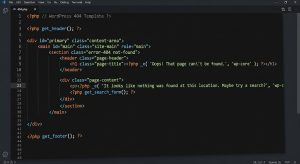
Here is a lightweight, effective PHP framework you can paste into your 404.php file:
<?php
/**
* The template for displaying 404 pages (not found)
*/
get_header(); ?>
<main id="primary" class="site-main error-404 not-found" style="text-align:center; padding: 50px 20px;">
<section class="error-404-content">
<header class="page-header">
<h1 class="page-title">Oops! That page can’t be found.</h1>
</header>
<div class="page-content">
<p>It looks like nothing was found at this location. Maybe try a search or check out one of our popular articles below?</p>
<div class="404-search-widget" style="max-width: 400px; margin: 30px auto;">
<?php get_search_form(); ?>
</div>
<div class="404-home-button" style="margin-bottom: 40px;">
<a href="<?php echo esc_url( home_url( '/' ) ); ?>" class="button">Return to Homepage</a>
</div>
<div class="404-recent-posts">
<h2>Recent Articles</h2>
<ul style="list-style:none; padding:0;">
<?php
$recent_posts = wp_get_recent_posts(array(
'numberposts' => 5,
'post_status' => 'publish'
));
foreach($recent_posts as $post) {
echo '<li><a href="' . get_permalink($post['ID']) . '">' . $post['post_title'] . '</a></li>';
}
wp_reset_query();
?>
</ul>
</div>
</div>
</section>
</main>
<?php get_footer(); ?>
This raw code does exactly what AdSense and users want: it loads instantly, provides a search bar via get_search_form(), dynamically fetches your five latest published articles, and offers a clear escape route back to the homepage.
Practices to Strictly Avoid on Error Pages
While designing your custom error page, avoid falling into common webmaster traps that actually degrade the user experience.
- Never Auto-Redirect to the Homepage: Some publishers try to “fix” 404s by adding a script that instantly redirects all broken URLs to the homepage. This is a terrible user experience. The user clicked a link expecting an article about indoor gardening lighting or a specific UPU admission step, and suddenly they are on a homepage with no explanation. Let them see the 404 page so they understand the specific content is missing, then allow them to search for it.
- Avoid Massive, Heavy Graphics: A 404 page should load in under a second. Do not embed a massive 3MB animated GIF or a complex video background attempting to be funny. If the user is already frustrated by a missing page, making them wait to load a heavy image will guarantee a bounce.
- Do Not Blame the User: Avoid aggressive copy like, “You typed the wrong URL!” or “You broke it.” Even if it was user error, phrase it passively and helpfully.
Tracking and Eliminating 404 Errors
Having a beautiful 404 page is only a safety net; the ultimate goal is to minimize how often it is seen. To maintain a pristine site architecture, you must actively track which URLs are triggering 404s and fix them at the root.
Google Search Console is the most reliable tool for discovering how search engines view your dead links. Navigate to the Indexing > Pages report and filter by the “Not found (404)” reason. This will provide a comprehensive list of URLs that Googlebot attempted to crawl but hit your error page.
If you recently deleted underperforming articles or restructured your URL taxonomies, these legacy URLs will appear here. Instead of letting them remain as 404s indefinitely, install a lightweight redirection management tool (like the Redirection plugin for WordPress) or use your server’s .htaccess file. Map the dead URLs to the most relevant existing article on your site using a 301 Permanent Redirect. This instantly rescues the lost link equity and ensures that any human clicking an old link from a social media post is seamlessly routed to the new, updated content.

Conclusion: Turning a Dead End Into a Crossroads
A custom 404 page is a hallmark of a mature, professionally operated website. It demonstrates to users and advertising review boards alike that you care about the entire lifecycle of your content. By combining empathetic messaging, clear site search functionality, and dynamic links to your best content, you transform a frustrating dead end into a helpful crossroads—keeping users engaged, lowering bounce rates, and fortifying your site’s overall quality.
Frequently Asked Questions (FAQs)
1. Does having 404 errors prevent my site from getting Google AdSense approval?
A few isolated 404 errors will not prevent approval. However, if your primary navigation menus, sidebar widgets, or major internal links lead to 404 pages, AdSense reviewers will likely reject the site for poor navigation or being “under construction.” Ensuring your site structure is unbroken is a strict prerequisite.
2. Should I block my 404 page from being indexed in robots.txt?
No. Search engines already know not to index pages that return a 404 HTTP status code. Blocking them in robots.txt prevents Googlebot from actually seeing the 404 status, which can sometimes cause the search engine to keep the dead URL in its index longer than necessary.
3. Is it better to redirect all 404 errors to the homepage?
Absolutely not. Blanket 301 redirects to the homepage create a confusing user experience and are treated as “Soft 404s” by Google. Only use a 301 redirect if you are sending the user to a highly relevant, closely related article that directly replaces the missing content.
4. How do I test if my custom 404 page is working properly?
Simply open a new browser tab and type your domain name followed by a string of random characters (e.g., [yourdomain.com/testing-fake-link-123](https://yourdomain.com/testing-fake-link-123)). This forces the server to look for a non-existent page and will instantly display your active 404 template.
5. Can I place AdSense ad units on my 404 error page?
Google explicitly forbids placing AdSense ad code on 404 error pages or any page that lacks substantial original content. Placing ads on error pages violates the AdSense program policies regarding “Pages with no content” and can put your entire account at risk of suspension.
References & Technical Sources
- Google Search Central Documentation: Do 404 errors hurt my site? https://developers.google.com/search/docs/advanced/crawling/404-pages
- Nielsen Norman Group: Error Message Guidelines (UX Research). https://www.nngroup.com/articles/error-message-guidelines/
- WordPress Developer Resources: Creating an Error 404 Page. https://developer.wordpress.org/themes/functionality/404-pages/
- Google AdSense Help Center: Ad placement policies – Pages with no content. https://support.google.com/adsense/answer/1346295