

Waking up to an inbox flooded with hundreds of automated, nonsensical messages is a frustrating rite of passage for almost every website owner. You launch a pristine new WordPress site, set up a beautiful contact page, and within days, malicious bots find it. Suddenly, your legitimate business inquiries are buried under a mountain of fake crypto offers, generic SEO pitches, and phishing links.
Contact form spam is not just an annoying inconvenience; it is a legitimate operational hazard. When automated scripts relentlessly submit your forms, they consume valuable server resources, artificially inflate your database size, and severely damage your domain’s email deliverability reputation. If your server is constantly forwarding spam to your linked Gmail or professional email address, spam filters will eventually start flagging your actual domain as a source of junk mail.
Securing your contact forms requires a multi-layered approach. Relying on a single line of defense is rarely enough to stop the sophisticated, AI-driven bots operating today. To maintain a clean inbox and a fast server, you need to implement a combination of invisible traps, behavioral analysis, and server-level blocking.
The Invisible First Line of Defense: Honeypot Fields
Before you subject your human visitors to complex puzzles or ticking checkboxes, you should implement a strategy that catches bots without inconveniencing real users. This is where honeypot fields excel.
A honeypot is an invisible trap set specifically for automated spam scripts. When a bot crawls your webpage, it doesn’t “see” the page the way a human does; it reads the raw HTML code. Bots are programmed to seek out form fields (like <input type="text">) and automatically fill them with data to complete the submission.
To set up a honeypot, you add an extra field to your contact form—perhaps labeling it something tempting like “website_url” or “secondary_email.” However, you use CSS (like display: none; or visibility: hidden;) to hide this field from human visitors.
Because humans cannot see the field, they leave it blank. Because bots only read the code, they fill it out. Your form software is then configured with a simple rule: if the hidden honeypot field contains any data whatsoever, the submission is immediately rejected as spam.
Most modern form builders, including popular options like WPForms, include honeypot protection as a built-in feature that can be toggled on with a single click. It is highly effective against basic, unsophisticated crawling bots and requires absolutely zero friction from your actual users.

Transitioning to Modern CAPTCHAs
When honeypots fail to catch the more advanced bots—specifically those that utilize headless browsers to mimic human rendering—you must employ a Turing test. The acronym CAPTCHA stands for “Completely Automated Public Turing test to tell Computers and Humans Apart.”
Historically, this meant forcing users to squint at distorted text or select pictures of traffic lights. Today, those methods are considered terrible for user experience (UX) and can actually decrease your legitimate conversion rates. Instead, you should utilize modern, frictionless CAPTCHA alternatives.
reCAPTCHA v3
Google’s reCAPTCHA v3 operates entirely in the background. It does not require the user to click “I am not a robot.” Instead, it analyzes the user’s behavior on your site—how they move their mouse, how long they spend on the page, and their IP history—and assigns them a spam score ranging from 0.0 (likely a bot) to 1.0 (likely a human). If a user’s score falls below a threshold you define, the form submission is blocked.
Cloudflare Turnstile
Many site owners are moving away from Google’s reCAPTCHA due to privacy concerns and the heavy JavaScript load it adds to the page. Cloudflare Turnstile is an excellent, privacy-focused alternative. It delivers a frustration-free, invisible challenge that runs in the background. It checks the browser environment for anomalies and verifies the user’s authenticity without ever serving a visual puzzle. Turnstile is lightweight, entirely free, and integrates seamlessly with most major WordPress form plugins.
Implementing Keyword and Character Blocking
Spam is often highly predictable. The vast majority of form spam revolves around a few specific industries: fake SEO services, pharmaceutical sales, cryptocurrency scams, and predatory web design offers.
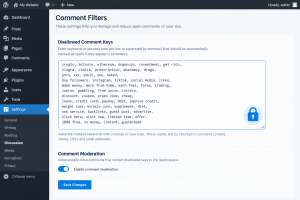
You can drastically reduce the noise in your inbox by implementing a custom allow/deny list directly within WordPress. By navigating to Settings > Discussion in your WordPress dashboard, you will find a box labeled “Disallowed Comment Keys” (which many form plugins also utilize for their own validation).
If a form submission contains any of the words you place in this box, it is automatically sent to the trash. Effective keywords to block often include:
cryptobitcoinSEO servicesfirst page of Googlecialis
Furthermore, if your business only operates locally or within a specific language demographic, you can block submissions containing foreign character sets. If you run a local plumbing business in Malaysia or a tech blog in English, there is rarely a legitimate reason for a user to submit a contact form written entirely in Cyrillic or Mandarin characters. Many form plugins allow you to set validation rules that reject submissions containing these specific character sets.
Custom PHP Validation for Granular Control
For users who manage their sites using custom code snippets (often via plugins like WPCode), adding server-side PHP validation offers the ultimate level of control.
Sometimes, bots use specific, throwaway email domains (like .ru, .xyz, or temporary mail services like Mailinator) to bypass standard checks. By writing a simple PHP filter, you can intercept the form data before it even hits your database.
You can create a script that checks the submitter’s email address against a list of known temporary email providers. If the email string ends in @guerrillamail.com or @yopmail.com, the PHP script immediately terminates the submission process and returns a validation error. This ensures your database remains free of fake users and your auto-responders aren’t bouncing back from dead inboxes.
Additionally, you can use PHP to enforce strict formatting rules. For instance, requiring that the “Message” field contains at least two spaces (proving it is a sentence and not just a dropped link) or ensuring the submission doesn’t contain more than two HTTP links, which is a classic hallmark of automated link-building spam.
Web Application Firewalls (WAF) and Edge Protection
The most efficient way to stop a bot is to prevent it from ever reaching your contact page in the first place. Relying entirely on WordPress plugins means your server still has to process the bot’s request, load the page, and execute the form’s logic before rejecting the spam. Under a heavy bot attack, this can cause CPU spikes and slow down your site for real visitors.
A Web Application Firewall (WAF) sits between your web server and the rest of the internet. Services like Cloudflare or Wordfence analyze incoming traffic before it even touches your WordPress installation.
Cloudflare Page Rules If you route your DNS through Cloudflare, you can set up specific firewall rules for your contact page URL (e.g., [yourdomain.com/contact/](https://yourdomain.com/contact/)). You can configure the WAF to issue a JS Challenge (a silent browser check) to any user attempting to access that specific URL from a country you do not do business with, or from an IP address known for malicious activity.
Wordfence Security If you prefer a plugin-based firewall, Wordfence maintains a massive, real-time database of IP addresses currently engaged in brute-force attacks and form spam across their entire network of sites. If an IP address is caught spamming a site in Europe, Wordfence will automatically block that same IP from accessing your contact form in the United States.
By pushing the security to the edge of your network or utilizing a WAF, you save your server’s resources and guarantee that only legitimate, human traffic is allowed to even view your contact form.
Frequently Asked Questions
Why am I suddenly getting hundreds of spam submissions a day?
Once a spam bot successfully submits a form on your site, your URL is often added to a shared list of “vulnerable” targets circulated among spammers. This results in a sudden, massive influx of spam from various different bot networks. Implementing strict CAPTCHA and honeypot rules usually stops the influx within a few days as the bots realize the form is no longer an easy target.
Will adding a CAPTCHA slow down my website?
Older versions of CAPTCHA (like reCAPTCHA v2) require loading heavy external JavaScript files, which can negatively impact your page speed and Core Web Vitals. To maintain fast load times, it is highly recommended to use Cloudflare Turnstile or reCAPTCHA v3, which are much lighter, or rely entirely on Honeypot fields and server-side filtering which add zero weight to the front end of your site.
Is it better to use a WAF or a form plugin’s built-in spam protection?
For maximum security, you should use both. A WAF (like Cloudflare) stops known malicious IP addresses from ever loading your site, protecting your server resources. However, some sophisticated bots use residential proxy IPs to bypass WAFs. Therefore, having a form plugin with built-in honeypots and keyword blocking acts as the necessary second layer of defense.
Sources and References
- Cloudflare Learning Center: Documentation on Bot Management, Web Application Firewalls (WAF), and the implementation of Cloudflare Turnstile as a privacy-first CAPTCHA alternative.
- WordPress.org Codex: Official security documentation regarding the usage of
Settings > Discussionfor mitigating comment and trackback spam via disallowed keys. - OWASP (Open Web Application Security Project): Guidelines on automated threat mitigation, specifically regarding form endpoint protection and preventing credential stuffing and spam abuse.